Fintech UX design: 9 patterns that make people trust a money app

Fintech UX design is the design of interfaces for financial products: banking, payments, wallets and trading. People trust a money app when it never leaves them guessing what they have, what an action will cost, what happened to their money and how it is protected. The nine patterns below make that happen, each shown on screens we designed for Solid, Banxe, Souq and BANKEX.
The nine patterns at a glance
| Pattern | The question it answers for the user | Shown on |
|---|---|---|
| 1. One balance leads the screen | How much do I have? | Solid, BANKEX |
| 2. A transaction history you can read at a glance | Where did my money go? | Solid |
| 3. Fees before the confirm button | What will this cost me? | Souq, Banxe |
| 4. Review, confirm, then a receipt | Did it go through? | Solid, BANKEX, Banxe |
| 5. One question per screen in onboarding | Why do you need my ID, and how long will this take? | Solid |
| 6. Security you can see | Is my account safe? | BANKEX, Banxe |
| 7. Colour only where it means something | Is this good news or bad news? | Solid |
| 8. Trust signals at the point of decision | Can I trust the other side of this deal? | Banxe |
| 9. One design system for every screen | Is this really the same company? | Banxe |
What makes fintech UX design different from other apps?
Three things. The stakes are the user’s own money, so a confusing screen costs more than a lost minute. Many actions cannot be undone: a transfer that has left the account will not come back with a tap. And the product is regulated, so identity checks, disclosures and limits are part of the interface whether the designer likes them or not.
That changes the job. In a game or a social app, design can add delight and surprise. In a money app its first task is to remove uncertainty: every screen should answer the question the user has at that moment before they have to ask it.
1. Lead with one balance, and say which balance it is
The first thing people check in a money app is how much they have, so one number should lead the screen, labelled with the account it belongs to and its currency. When a user has several accounts, show each with its own balance and a total, and keep money that belongs to different owners visibly apart.
In the Solid Wallet app accounts are grouped by owner, a person or a company, with a subtotal per group, so personal and company money never mix on one list. On desktop, tabs along the top switch between accounts such as Receivables and Purchase, each with its balance, and the overview leads with a black balance card. The BANKEX Crypto Wallet opens on the total funds in dollars, then one card per coin wallet with its price, change and balance.

If part of the money is on hold or still pending, say so next to the number. A balance that later turns out to be smaller than shown is the fastest way to lose a user’s trust.
2. Make every transaction readable at a glance
A transaction row should answer five questions without a tap: who, how much, in or out, when, and by which route. If the user has to open a row to find out what it was, the history is not doing its job.
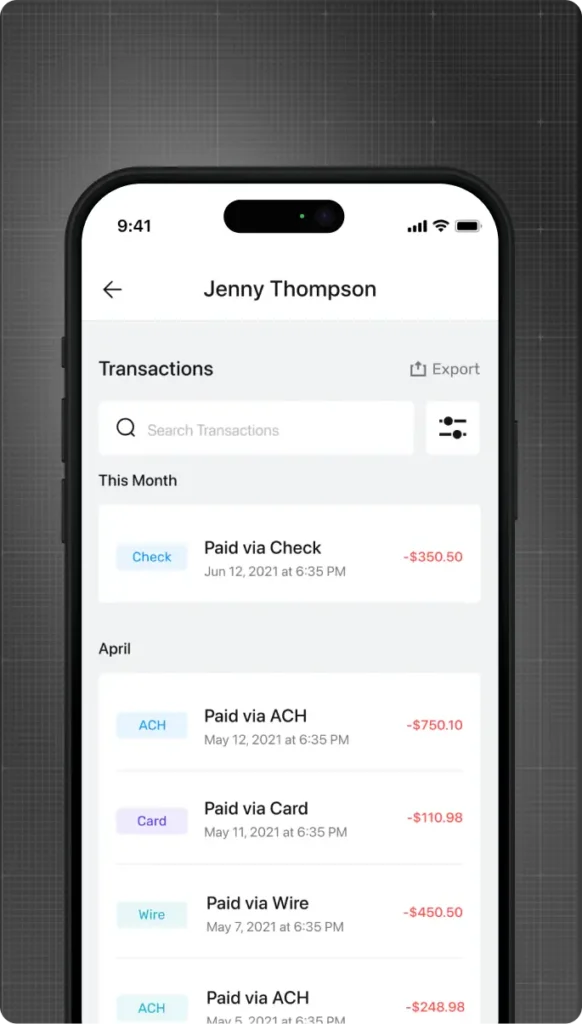
Solid splits the history by month, and each row carries a tinted tag for the payment rail: ACH, Card, Wire or Check. Money out is red, money in is green. The desktop Transactions page adds search, filters and export, because a business user reconciles payments against invoices and needs to find one row among hundreds.
3. Show fees and rates before the confirm button
A fee discovered after the money has moved feels like a trick, even when it is small and legitimate. Show every cost on the screen where the user decides: what they pay, what they receive, and what is deducted on the way.
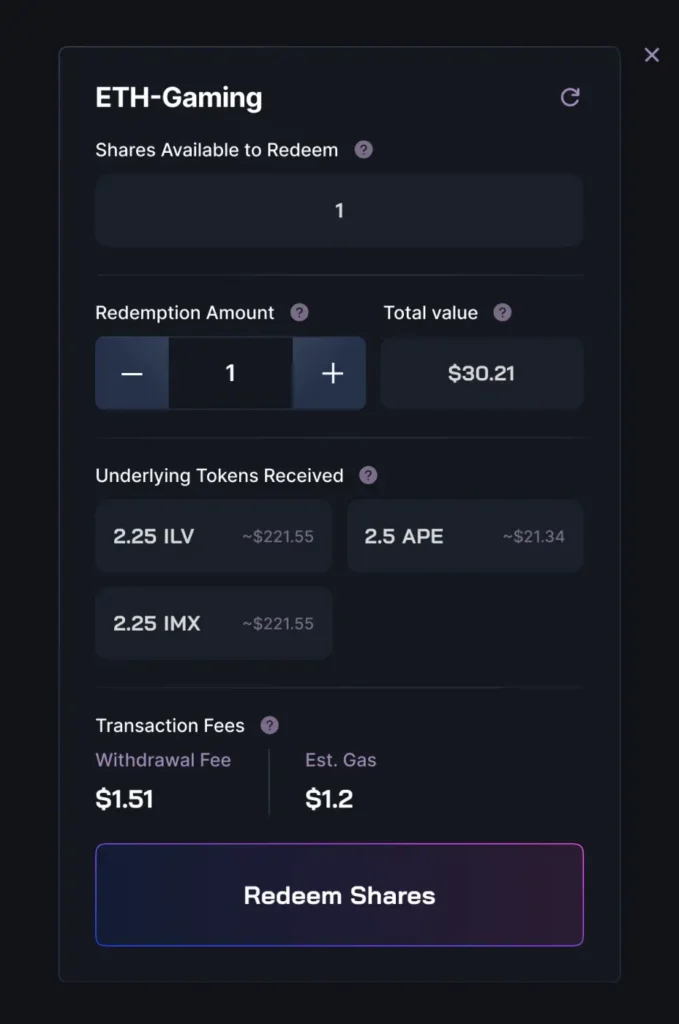
In Souq, a financial market for web3 game economies, every staking vault action ends in a confirmation window, and we designed them as one family. They follow the same order: the vault name on top, amounts in dark tiles, then the fees itemised before the button (deposit, redemption, gas, DEX fee, slippage, price impact) and one confirm button at the end. On the Banxe exchange, deposit and withdrawal pages put the network choice (ERC20, BEP20 or BEP2) next to the QR code, because the network decides both the cost and whether the money arrives at all.
4. Review, confirm, then a receipt that restates what happened
Money movement needs three moments: a review of what is about to happen, one clear confirm action, and a receipt that says what moved, where and when. The receipt matters as much as the button: it is the screen people screenshot and send to a colleague or a counterparty.
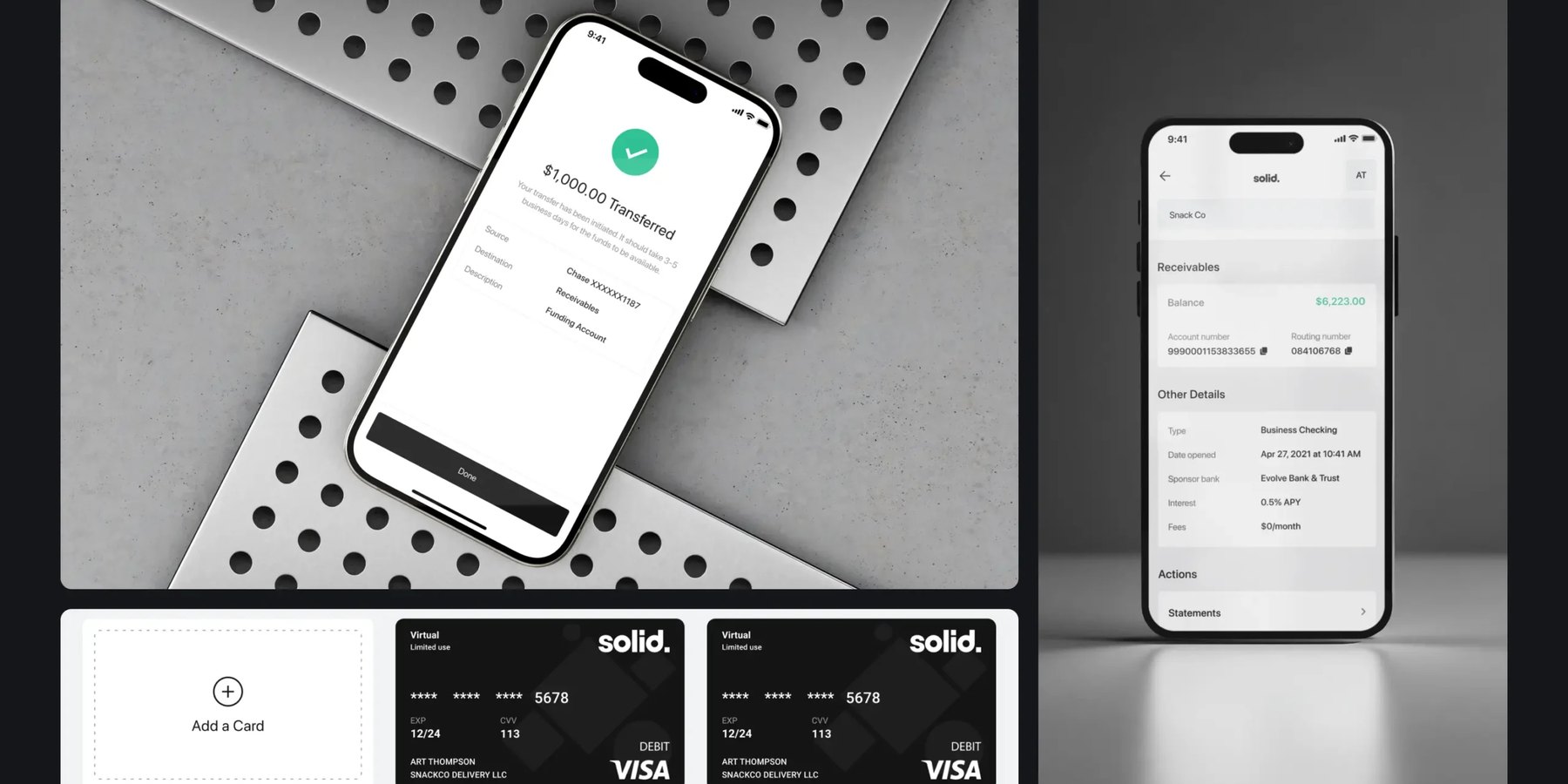
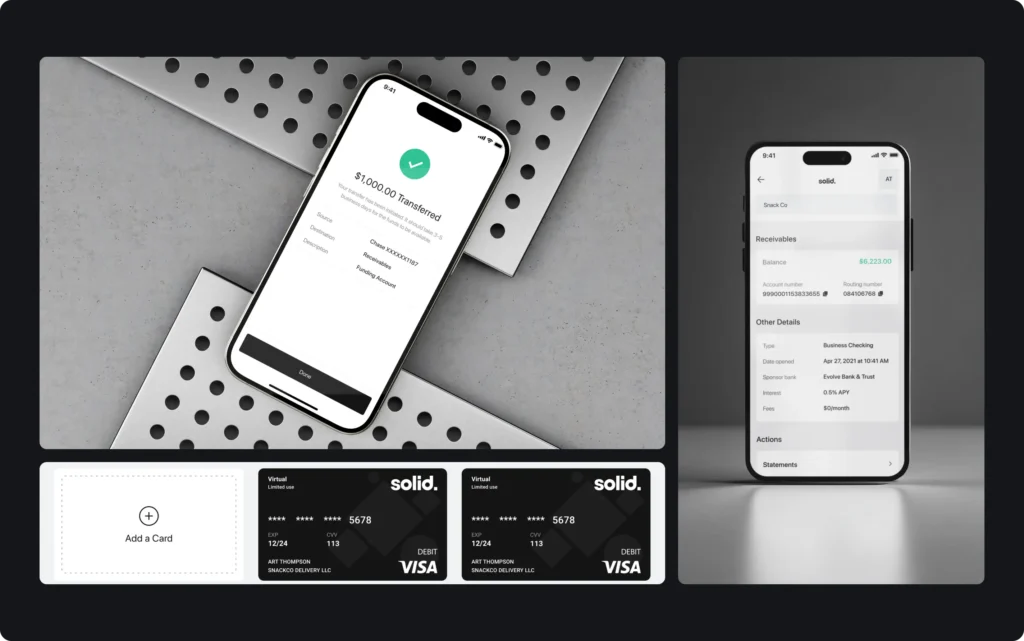
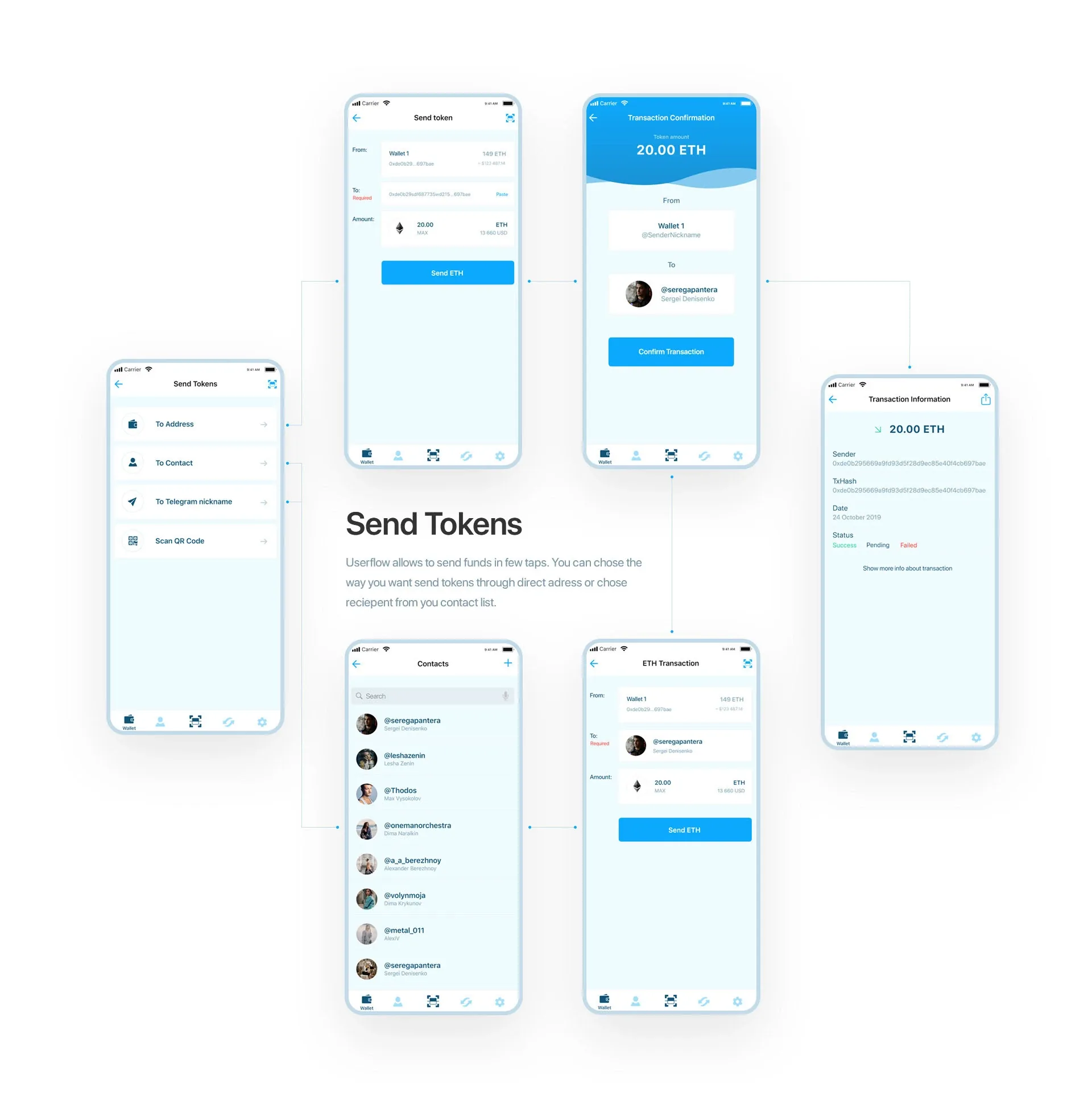
In the Solid app money movement keeps one rhythm: choose the source and the destination, enter the amount, and land on a green tick that restates what moved and where. Every step ends on the same full-width black button. In BANKEX, sending goes through a confirmation that shows the amount and both wallets, and an exchange has its own progress and failure screens. Banxe success screens carry a green hexagon check and a copyable transaction hash.
Design the failure case with the same care. “The transfer did not go through. Your balance has not changed.” tells the user the one thing they need to know; an error code does not.
5. In onboarding and KYC, ask one thing per screen
Identity verification (KYC) is one of the steps where fintech sign-ups slow down, and it cannot be skipped. So the design task is to make it feel short and predictable: one question per screen, a clear order, and a reason for every piece of data the app asks for.
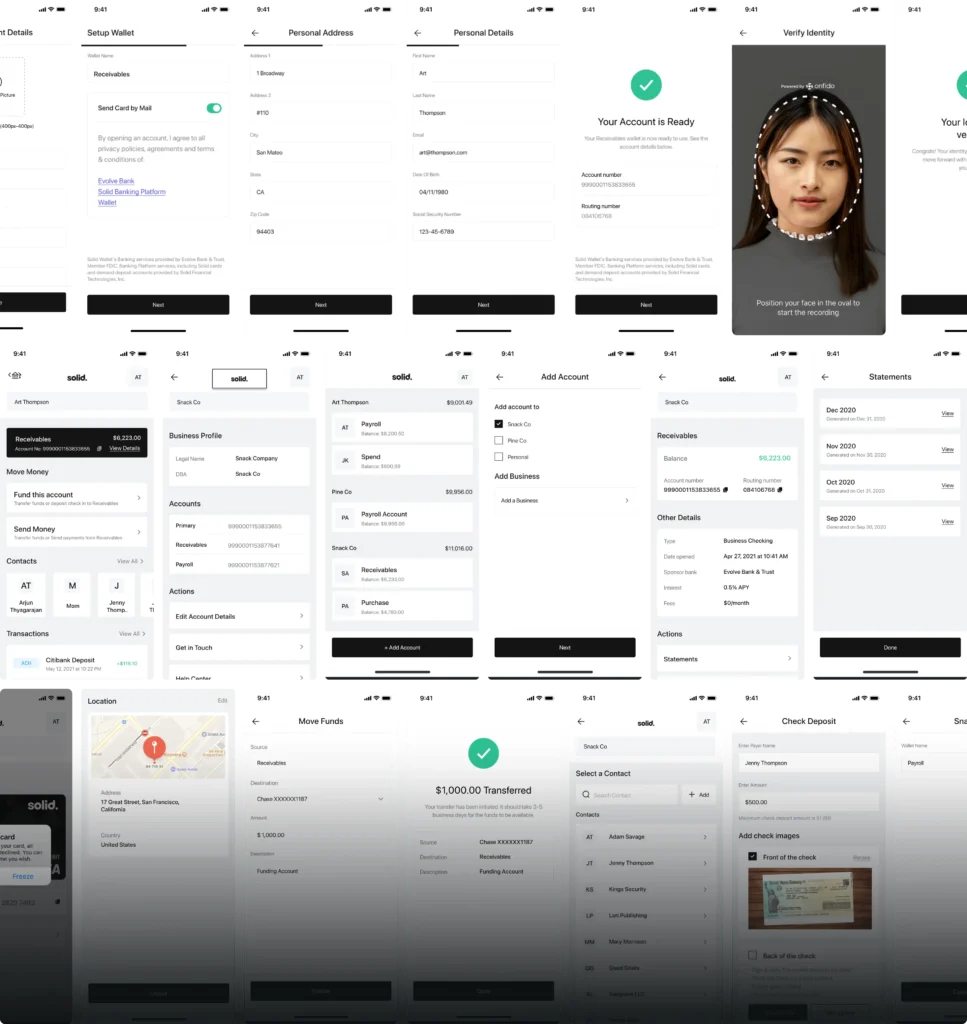
Solid splits account opening into short stops. Wallet setup comes first, with a switch for whether the card should arrive by mail; then the address, the personal details and the identity check, where a dashed oval shows where to place the face. The last screen gives what the whole flow was for: the new account number and routing number. The sponsor bank’s disclosure stays under the form in small print, readable but not competing with the task.
6. Make security visible, and keep it calm
Users want to see that their money is protected, but security steps that sound alarming make people hesitate. Show protection as a normal part of the flow, and mark the actions that cannot be undone.
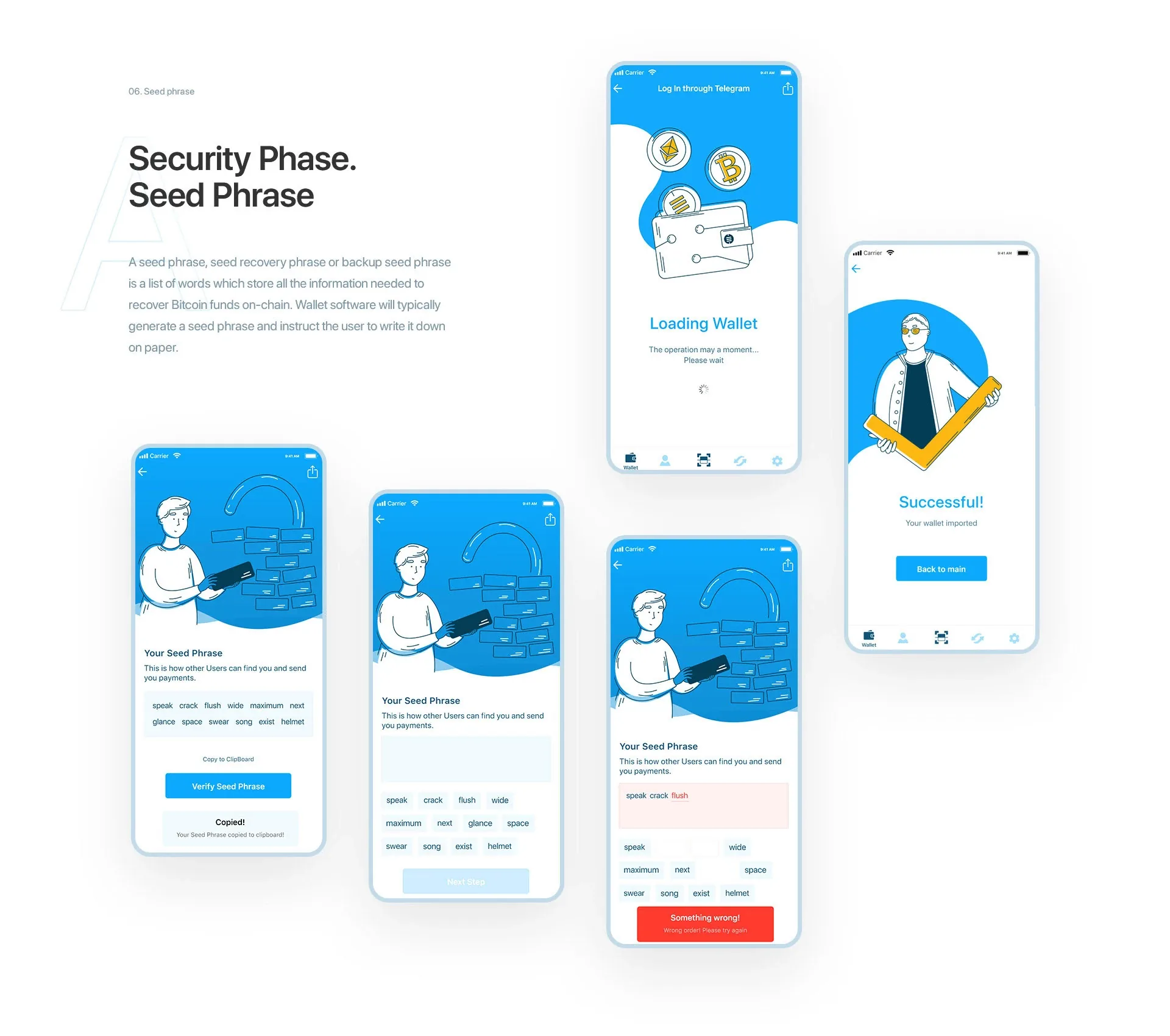
In the BANKEX wallet a six-digit PIN guards the app, and a wrong entry gets a message of its own instead of a generic error. Setting up a new wallet includes a seed-phrase check: the app lists the recovery words, then asks the user to type them back, and any mistake turns red. A line-drawn character accompanies every step, which takes the edge off a task most people find technical. Banxe’s card settings are a plain list of rows, Change PIN, Re-create card, Block card and Close card, and only the two that cannot be undone are tinted red.
7. Use colour only where it means something
In a money app colour is information: green reads as money in or done, red as money out or a problem. If colour also decorates the interface, those signals stop working.
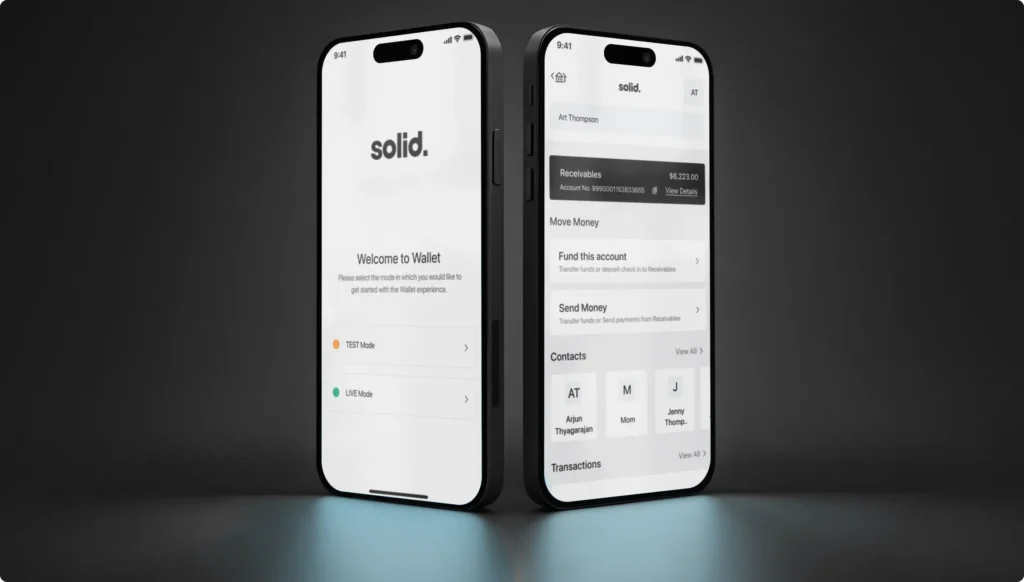
Solid keeps its screens monochrome, black and white on a light grey ground, and spends colour only where it means something. Green marks incoming money and finished actions, red marks money going out, pastel tags name the payment type, and orange means test mode. Even avatars are grey squares with initials rather than photos. Before anything else, the app asks whether to start in TEST or LIVE, and a small orange or green dot keeps that choice in view, so a business cannot mistake a test payment for a real one. For contrast, dEquity, a real estate tokenization platform we designed, pairs a light investment website with a dark-mode trading interface for property tokens.
Pair colour with a sign or a word as well (a minus, “Failed”, “Pending”), so the meaning survives for people who do not see the difference between red and green.
8. Put trust signals where the decision happens
When the user deals with another person, a seller, a buyer or a counterparty, the information they need to judge that person belongs on the screen where they decide, not on a profile page two taps away.
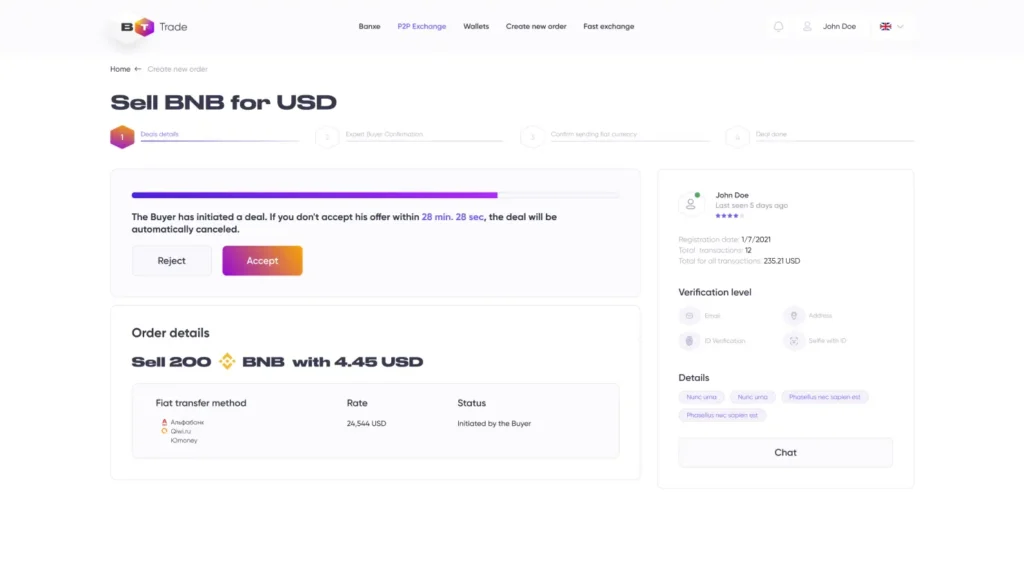
The P2P deal screen on the Banxe exchange carries the most logic of the whole product. A four-step stepper tracks the deal, and a purple countdown shows when an offer cancels itself. Beside it, the counterparty panel lists the registration date, the number of transactions, the rating and the verification level, with a Chat button, so the trust check happens without leaving the order.
9. Keep one design system across the app, the website and the brand
Consistency is a security feature in finance. People who use a money app every day notice when a screen looks different, and a page that does not look like the company is exactly what a phishing attempt looks like. One design system, with the same type, colours, icons and components everywhere, makes the real product recognisable.
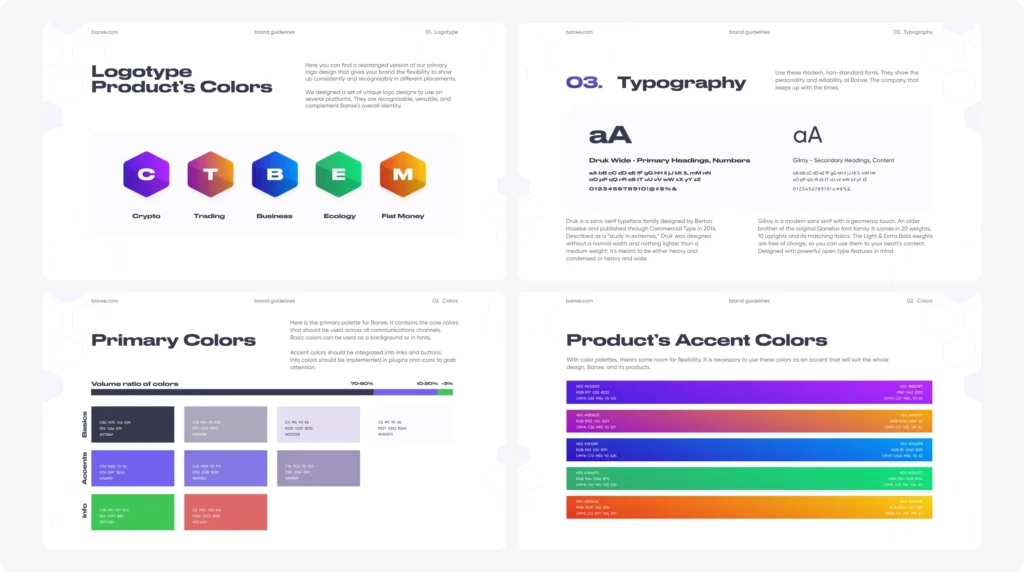
Banxe joins fiat and crypto services in one platform, and its brand guidelines are where the screen rules live. Each of the five products, Crypto, Trading, Business, Ecology and Fiat Money, has a hexagon with a gradient of its own. Numbers and headings use Druk Wide and body text uses Gilroy, which is why balances look wide and heavy while the forms around them stay calm. The palette has a budget: graphite and lavender fill 70 to 80 percent of a layout, violet accents 10 to 20, and the green and red information colours get only a sliver. The exchange, the app and the pitch deck draw on that one kit.
How do you check that a fintech interface earns trust?
Test the moments where money moves, with people who match your users. Ask them to make a first deposit, send money to someone, find what a transfer cost and cancel something, and watch where they hesitate. A pause before the confirm button usually means the screen has not answered a question yet.
Then go through every state that is not the happy path: an empty account, a pending payment, a failed transfer, a rejected identity check, a lost connection. Each one should say what happened to the money and what the user can do next. Finally, review the flows with whoever owns compliance early, while changes are still cheap.
How thelegacy works on fintech products
thelegacy is an independent design studio working since 2012, and fintech and crypto products make up most of our published work. We design web dashboards and mobile apps, the brand identity that ties them together, and the pitch decks that raise money for them, so one team carries a product’s visual system from the identity to the app screens to the deck.
The cases behind this article: Solid (business banking: web dashboard and Wallet app), Banxe (fiat and crypto platform: exchange, app and brand), Souq (staking vaults for web3 game economies) and BANKEX (crypto wallet). More are in our UX/UI and web design and mobile app portfolios. If you are building a financial product, tell us about it.
Key takeaways
- Fintech UX design is the design of interfaces for financial products, and its first job is to remove uncertainty about the user's money.
- A trustworthy money app leads with one labelled balance, makes every transaction readable at a glance and shows every fee before the confirm button.
- Money movement needs a review step, one confirm action and a receipt that restates what moved, where and when; a failure must say what happened to the money.
- KYC onboarding works best with one question per screen, a reason for each piece of data and legal disclosures that are present but out of the way.
- Colour should carry meaning only, security should be visible but calm, and one design system across the app, the website and the brand makes the real product recognisable.
Frequently asked questions
What is fintech UX design?
Fintech UX design is the design of interfaces for financial products such as banking, payments, wallets and trading. Its main task is to remove uncertainty: at every step the user should know what they have, what an action will cost, what happened to their money and how it is protected.
What makes a fintech app trustworthy?
One clearly labelled balance, a transaction history readable at a glance, fees shown before the confirm button, a receipt after every transfer, visible but calm security, colour used only for meaning and one consistent design system across the app, the website and the brand.
How should a fintech app show fees?
On the screen where the user decides, before the confirm button: what they pay, what they receive and every deduction on the way, itemised. In Souq's confirmation windows, for example, deposit, redemption, gas, DEX fee, slippage and price impact are listed before the single confirm button.
How do you design KYC onboarding that people finish?
Ask for one thing per screen in a predictable order, explain why each piece of data is needed, frame the photo or ID capture clearly and end on a confirmation that gives the user something concrete, such as their new account details. Keep legal disclosures readable but out of the way of the task.
Should a fintech app use dark mode?
It depends on the task. Dark interfaces suit screens people watch for long stretches with dense, changing data, such as trading terminals; light ones suit forms, onboarding and reading. dEquity, a real estate tokenization platform we designed, has both: a light investment website and a dark-mode trading interface.
Does thelegacy design fintech apps?
Yes. Fintech and crypto products make up most of our published work, including Solid (business banking), Banxe (a fiat and crypto platform), Souq (staking vaults for web3 game economies) and BANKEX (a crypto wallet). We design web dashboards, mobile apps, the brand identity and the pitch deck.